Open materials
LAN Switch Operations and Maintenance
A hands-on course in four modules, first taught in 2007 on Enterasys switches and rebuilt for this 2026 edition with the current CLI of eight vendors, in English and Brazilian Portuguese
A complete operations course for enterprise LAN switches: access, users and the CLI session; saving, clearing, backing up and upgrading; ports, link aggregation, VLANs and Spanning Tree; IP addressing, ARP and routing; then OSPF, VRRP, ACLs, syslog, SNMPv3, RADIUS and TACACS+, multicast, and a method for troubleshooting and for opening a support case. Every topic is taught on the 2007 Enterasys platform and then, command by command, on eight current CLIs side by side. All 564 slides carry speaker notes, and every command row cites the vendor document it comes from.
Based on the operations and maintenance course Rodolfo Nützmann taught in 2007 for the Enterasys SecureStack and Matrix lines, and rebuilt in 2026: 16:9 slides, the 2007 material kept where it still teaches and marked LEGACY 2007, and beside it MODERN CLI slides for Extreme Switch Engine and Fabric Engine, Cisco IOS XE (17.18.x and 26.1.x), HPE Aruba Networking AOS-CX, Juniper Junos, MikroTik RouterOS, Arista EOS and Huawei VRP, each row checked against the vendor's current documentation.
At a glance
- Level
- Operations, from first access to troubleshooting; basic networking assumed, and the opening assessment checks it
- Format
- Editable deck with speaker notes (PPTX)
- Slides
- 564 per edition, the same slides in both languages
- Speaker notes
- On all 564 slides, in both languages
- Languages
- English (US) and Portuguese (Brazil)
- Edition
- 2026
- First taught
- 2007
- Price
- Free, no sign-up
Who it is for
Learners. Each topic starts with how a 2007 switch did it and ends with the same task on the switches in use today: read the MODERN CLI slide for your vendor, try the commands in a lab, and measure yourself with the assessments at the start and at the end of the course.
Instructors. The notes say what to teach on each slide, what to ask the class, how to run each lab and where each command comes from: every MODERN CLI row cites the vendor document it was checked against. The deck is fully editable, so a class can keep only the vendors it runs.
A look inside
6 of the 564 slides, chosen for their diagrams. Each one opens at full size.
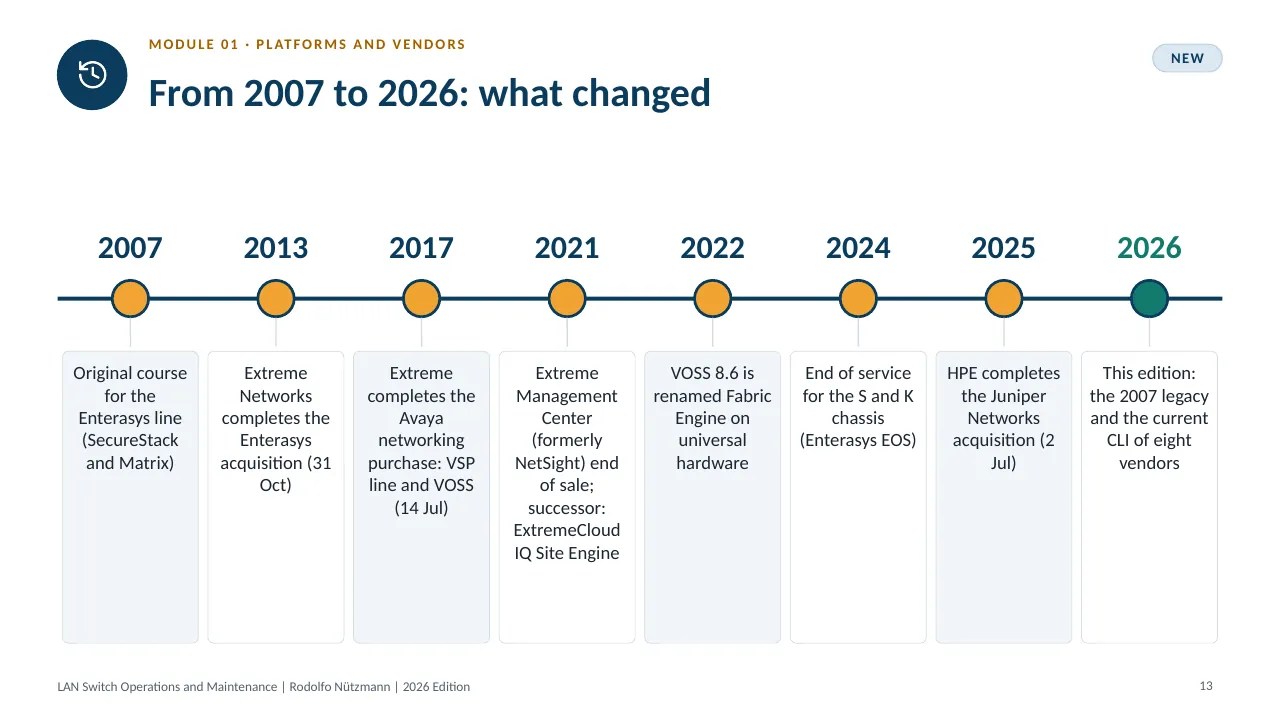
From 2007 to 2026: what changed 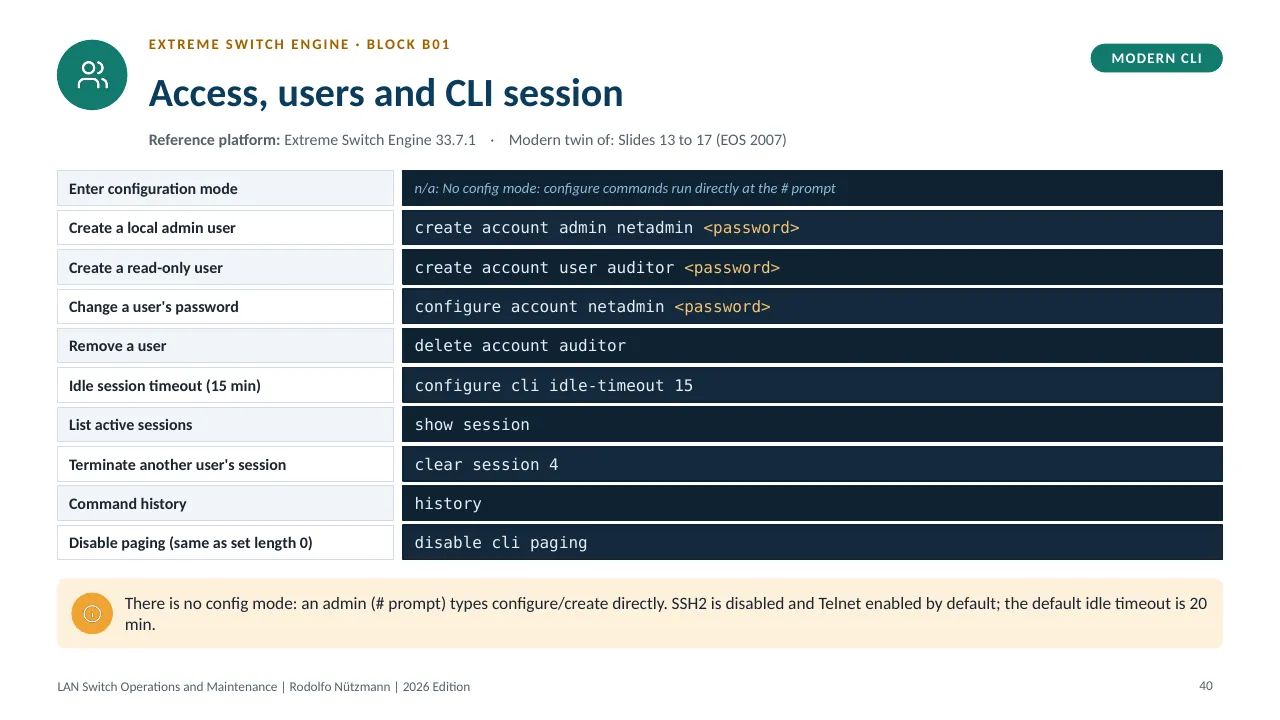
Access, users and CLI session 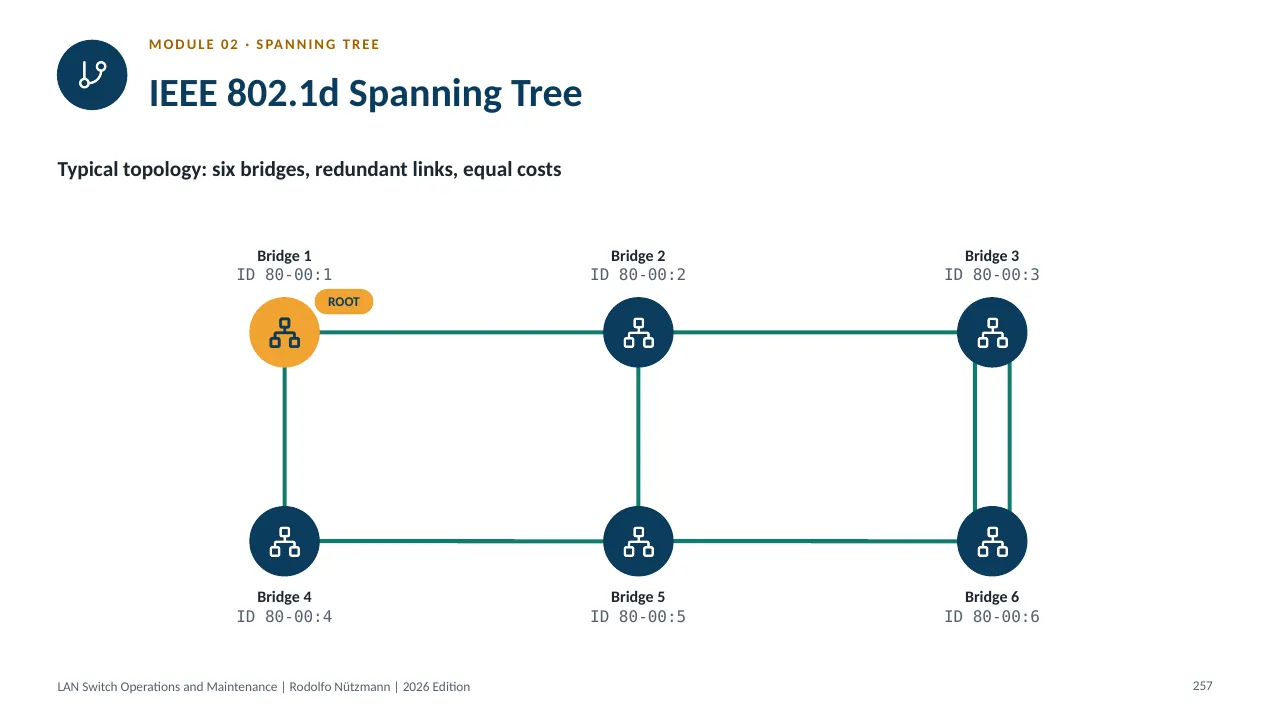
IEEE 802.1d Spanning Tree 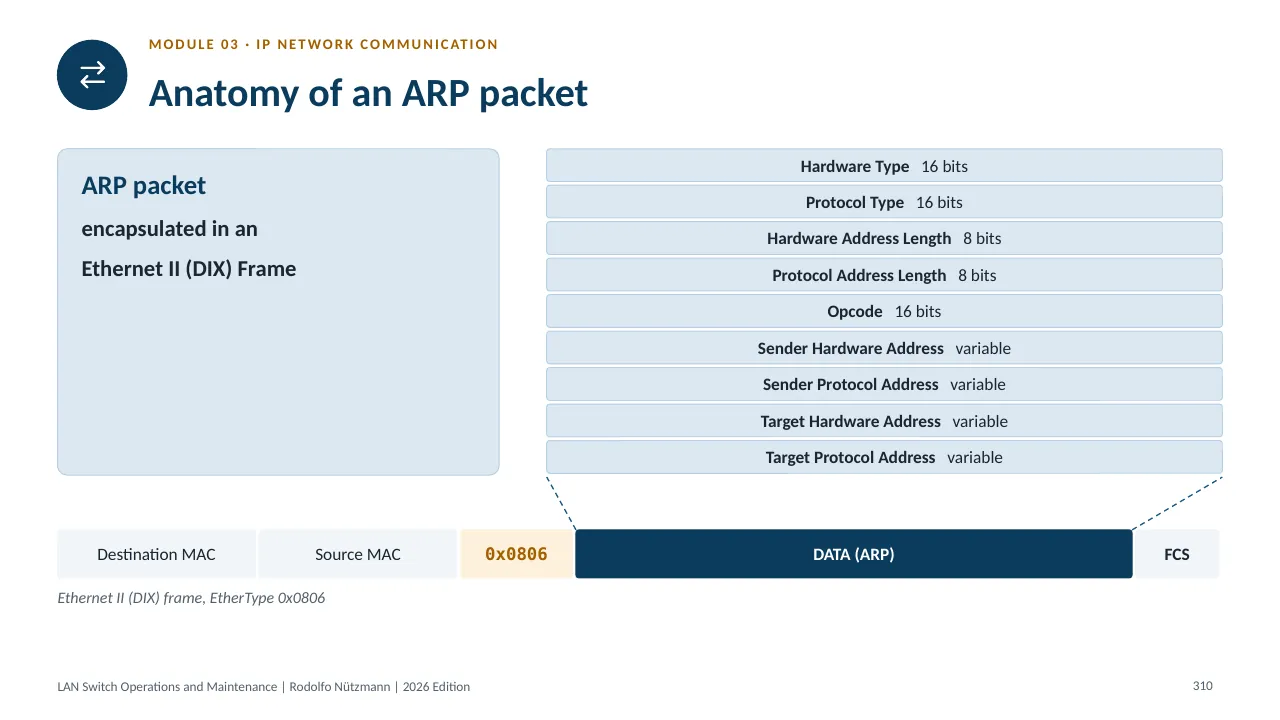
Anatomy of an ARP packet 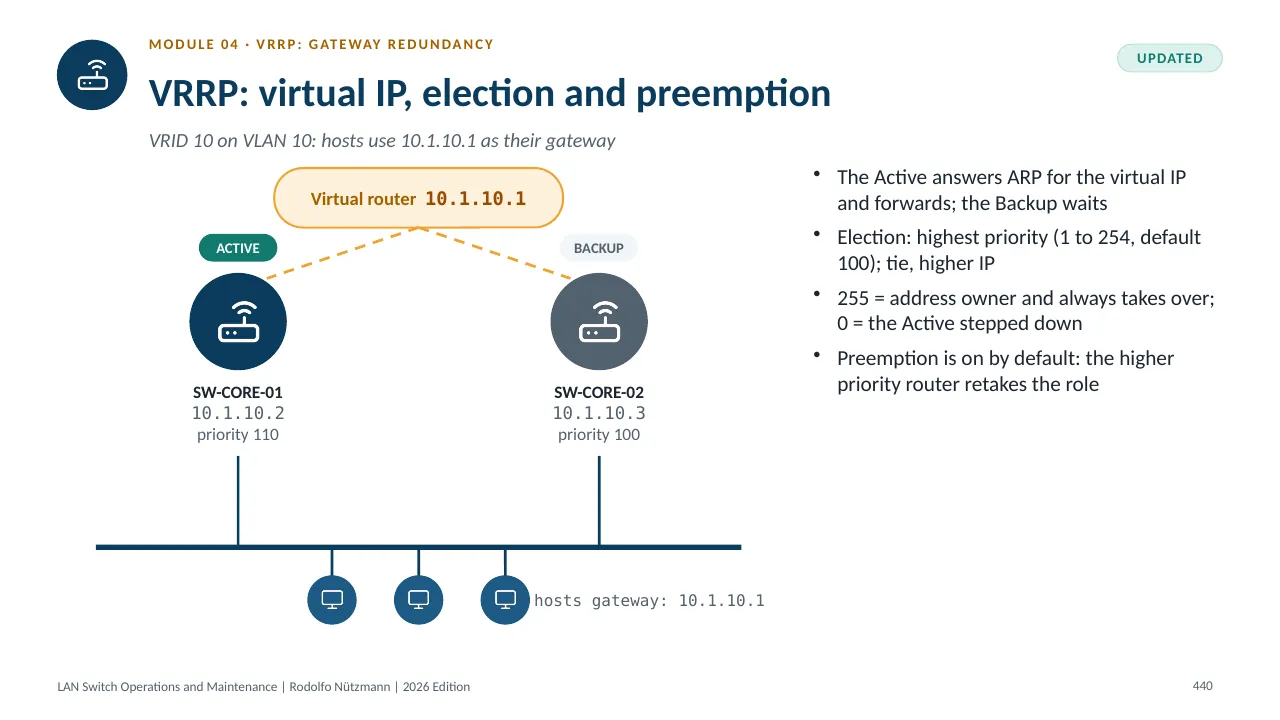
VRRP: virtual IP, election and preemption 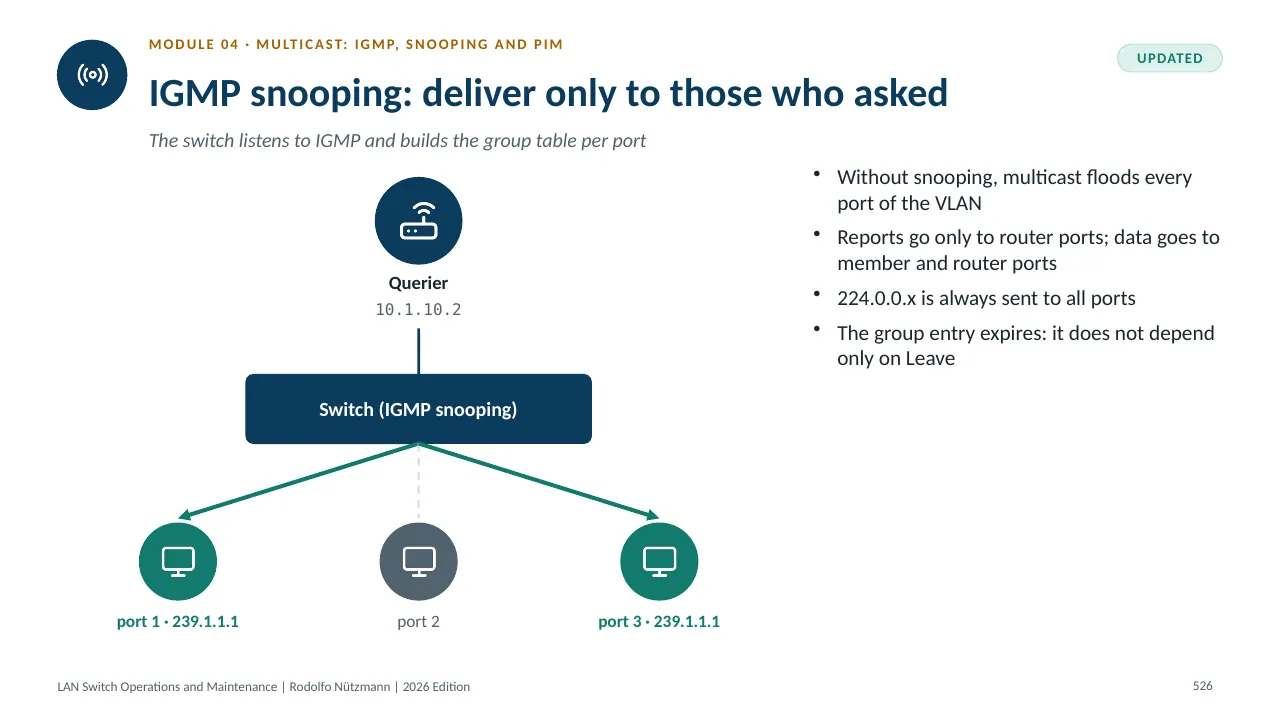
IGMP snooping: deliver only to those who asked
Want this course taught live?
Rodolfo Nützmann teaches it as an instructor-led class for teams, on site or virtual, in English or Portuguese: a field veteran of three decades who teaches for a living, with real demonstrations and hands-on labs that take the subject past the slides.
Course outline
Slides 1 to 10 open the course: the cover, the contents linked to every chapter, the first module's cover and agenda, the introductions, the objectives and the format. Each later module opens with its own cover and agenda, and every chapter with a cover and an agenda of its own; labs close most chapters, two final labs and a final assessment close the last, and slide 564 closes the course.
Module 1: Access, operation and basic maintenance
Chapter 1.1 · slides 11 to 27
Platforms and vendors
Present this chapter →- From 2007 to 2026: what changed
- Reference platforms and the eight vendor profiles
- CLI families: what carries over to other vendors
- Cloud-managed switching, the other operating model
- How to read the MODERN CLI slides
- Initial knowledge assessment
Chapter 1.2 · slides 28 to 74
Basic concepts
Present this chapter →- Switch access: console and remote management
- Access privileges and user management
- CLI session: history, paging and shortcuts
- Clock, time zone and NTP
- Prompt, name, banner and management IP
- Lab: basic configuration
Chapter 1.3 · slides 75 to 131
Basic maintenance
Present this chapter →- Clearing the configuration and rebooting the switch
- Recovering access after lost passwords
- Configuration files and backups over SCP and SFTP
- Reconfiguring the switch from files
- Firmware upgrade
- Lab: basic maintenance
Module 2: Layer 2 switching
Chapter 2.1 · slides 132 to 204
Switch ports
Present this chapter →- Interface naming and operational state
- Auto-negotiation, speed and duplex
- Flow control and broadcast suppression
- Auto-MDI/MDIX, protected ports and jumbo frames
- Port mirroring
Chapter 2.2 · slides 205 to 220
Link aggregation (LACP)
Present this chapter →- LACP: link aggregation with dynamic control
- Group, members, LACP rate and traffic distribution
- From IEEE 802.3ad to 802.1AX-2020
Chapter 2.3 · slides 221 to 253
VLAN
Present this chapter →- 802.1Q VLANs: isolated broadcast domains
- Egress, PVID, tagged and untagged ports
- Dynamic registration: GVRP and MVRP
- VLAN management
- Labs: port configuration, link aggregation, protected ports, VLANs and broadcast suppression
Chapter 2.4 · slides 254 to 293
Spanning Tree
Present this chapter →- 802.1D: root bridge election and port states
- 802.1w RSTP: port roles and topology changes
- Spanning Tree verification commands
- Span Guard: blocking BPDU attacks
- Lab: Spanning Tree and Span Guard
Module 3: IP routing
Chapter 3.1 · slides 294 to 342
IP network communication
Present this chapter →- IP addressing, binary and the subnet mask
- Address classes and the bitwise AND
- Route determination and the routing table
- ARP: packet anatomy and operation
- Proxy-ARP, step by step
Chapter 3.2 · slides 343 to 410
IP routing
Present this chapter →- Routing devices and features
- IP interfaces, host interface and loopback
- Router mode and basic configuration
- Static routes, RIP and OSPF
- Route precedence and ECMP
- ARP management
- Junos: EX switches against MX routers
- Lab: IP interfaces and static routes
Module 4: Redundancy, security and management
Chapter 4.1 · slides 411 to 437
OSPF: dynamic routing
Present this chapter →- Link state and areas
- Neighbour states, DR and BDR
- Network types, cost and LSAs
- Authentication: from MD5 to HMAC-SHA
- OSPF on the Enterasys CLI and on eight current CLIs
- Lab: OSPF between the core and the uplink
Chapter 4.2 · slides 438 to 453
VRRP: gateway redundancy
Present this chapter →- Virtual IP, election and preemption
- Timers and versions 2 and 3
- VRRP on the Enterasys CLI and on eight current CLIs
- Lab: a redundant gateway on VLAN 10
Chapter 4.3 · slides 454 to 471
ACLs: traffic filtering
Present this chapter →- First match and implicit deny
- Standard or extended, wildcard or prefix
- ACLs on the Enterasys CLI and on eight current CLIs
- Lab: protect the management VLAN
Chapter 4.4 · slides 472 to 486
Syslog: the central event record
Present this chapter →- From device to server
- The eight severities
- Formats and transports: UDP, TCP and TLS
- Syslog on the Enterasys CLI and on eight current CLIs
Chapter 4.5 · slides 487 to 505
SNMP: layered management
Present this chapter →- Manager, agent and notifications
- v1, v2c and v3
- SNMPv3 security levels and algorithms (USM)
- MIB, OID and notifications
- RMON: remote monitoring, the 2007 heritage
- SNMPv3 on the Enterasys CLI and on eight current CLIs
Chapter 4.6 · slides 506 to 521
AAA: RADIUS and TACACS+
Present this chapter →- The path of a management login through RADIUS
- RADIUS or TACACS+?
- RADIUS on the Enterasys CLI and AAA on eight current CLIs
- Lab: syslog, SNMPv3 and RADIUS
Chapter 4.7 · slides 522 to 540
Multicast: IGMP, snooping and PIM
Present this chapter →- IPv4 multicast: the address blocks
- IGMP: the three versions
- IGMP snooping: deliver only to those who asked
- PIM-SM: the delivery tree and the rendezvous point
- DVMRP: flood-and-prune multicast (legacy)
- Lab: multicast with IGMP snooping and PIM-SM
Chapter 4.8 · slides 541 to 563
Troubleshooting and support
Present this chapter →- Climb the layers, bottom up
- The six-step method
- Common symptoms and where to start
- Before opening a case: what to collect
- Final labs: a redundant core; protection and management
- Final knowledge assessment
Learning objectives
Module 1: Access, operation and basic maintenance
- Access and manage the switches. Access, configure and manage the devices from the console and over the network, with users, privileges and a CLI session set up for daily work.
- Keep the configuration safe. Manage configuration files and backups, reset the configuration to factory defaults and recover access to a device whose password is unknown.
- Upgrade the firmware. Upgrade the switch firmware and choose the image it boots.
- Read any vendor's CLI. Recognize the 2007 Enterasys platforms and their current equivalents on eight vendors, and carry what you learn to other CLI families.
Module 2: Layer 2 switching
- Ports. Configure and verify port parameters: naming and state, speed and duplex, flow control, broadcast suppression, protected ports and mirroring.
- Link aggregation. Build a link aggregation group with LACP and explain how traffic is spread across its members.
- VLANs. Configure 802.1Q VLANs with their egress, PVID, tagged and untagged ports.
- Spanning Tree. Explain root election and port roles in 802.1D and RSTP, and protect the edge against BPDU attacks.
Module 3: IP routing
- Addressing and ARP. Work out a host's network with the mask and the bitwise AND, and follow ARP and Proxy-ARP packet by packet.
- Routing on a switch. Configure IP interfaces, loopbacks and static routes, enable RIP and OSPF, and read route precedence and ECMP in the routing table.
Module 4: Redundancy, security and management
- OSPF. Configure and verify OSPFv2 on a Layer 3 switch: cost, authentication and redistribution.
- VRRP. Build gateway redundancy with VRRP: election, priority and preemption.
- ACLs. Protect a VLAN with ACLs and interpret the hit counters.
- Syslog and SNMPv3. Send logs to a syslog server and monitor the switch with SNMPv3.
- RADIUS and TACACS+. Centralize administrative access with RADIUS and TACACS+.
- Multicast. Explain IGMP snooping and PIM-SM and check the multicast groups.
- Troubleshooting and support. Troubleshoot methodically, use a protocol analyser and gather the evidence a vendor's support team needs.
From 2007 to 2026
| Topic | In 2007 | In 2026 |
|---|---|---|
| Platforms | Enterasys SecureStack and Matrix N: one vendor's CLI | The current CLIs of eight vendors side by side: Extreme Switch Engine and Fabric Engine, Cisco IOS XE, HPE Aruba Networking AOS-CX, Juniper Junos, MikroTik RouterOS, Arista EOS and Huawei VRP |
| The vendors | Enterasys, an independent company | Extreme Networks completed the Enterasys acquisition in 2013 and the Avaya networking purchase in 2017; HPE completed the Juniper acquisition in 2025 |
| Remote management | Telnet or SSH; NetSight over SNMP v1, v2c or v3 | SSH; Cisco IOS XE 26.1 blocks Telnet, HTTP, TFTP and SNMP v1 and v2c unless system mode insecure is set; cloud dashboards as a second operating model |
| Link aggregation | IEEE 802.3ad | IEEE 802.1AX-2020 |
| OSPF authentication | A simple password of up to eight characters, or MD5 | HMAC-SHA (RFC 5709), with RFC 7474 against replay |
| Gateway redundancy | VRRPv2 (RFC 3768), IPv4 only | VRRPv3 (RFC 9568, 2024), IPv4 and IPv6 |
| SNMP | Clear-text communities in v1 and v2c; v3 with HMAC-MD5 or HMAC-SHA and 56-bit DES | SNMPv3 with HMAC-SHA-2 (RFC 7860) and AES-128 (RFC 3826) |
| Syslog | UDP to port 514, facility local4 by default, the last 256 messages in the switch's buffer | TLS on TCP port 6514 (RFC 5425, updated by RFC 9662) and the RFC 5424 format, which carries the time zone |
| Device administration | RADIUS | RADIUS over TLS (RFC 6614 and RFC 9765, both experimental); TACACS+ documented in RFC 8907 and carried over TLS 1.3 (RFC 9887) |
| IGMPv3 | RFC 3376 (2002) | RFC 9776 (2025), an Internet Standard |
Drawn from the course's own slides: the 2007 column is what its LEGACY 2007 slides and their notes describe, the 2026 column what its MODERN CLI and updated slides teach (slides 13, 17, 32, 210, 420, 441, 474, 477, 491, 509 and 530).
Downloads
| File | Size | SHA-256 | Download |
|---|---|---|---|
| English (US) · PowerPoint (PPTX)Instructor's edition: the editable deck with the speaker notes | 3.4 MB | 22af7ddb00b69f4dd9710e3cc4614d927390f3ba7f049166f5a6e94f345d7f80 | Download |
| Portuguese (Brazil) · PowerPoint (PPTX)Instructor's edition: the editable deck with the speaker notes | 3.4 MB | bd3cd20d7b55e9766882c9e92f73b8aa0f12890cb0df1842d9efae0bd7730853 | Download |
Licence
Offered under CC0 1.0 Universal. You can copy, modify, translate, distribute and teach with this course, commercially or not, without asking permission.
Credit to Rodolfo Nützmann is appreciated, never required. As the CC0 deed asks, do not imply endorsement by the author when you use the material.
Learn more on this site
Articles that teach the same ground in more depth, from the Learn library.